

The Pulsar Axion 2 XQ35 is worth comparing if you want a handheld thermal monocular with recording, a replaceable battery, and a manageable base magnification. Its appeal is the balance between scanning coverage and portability, rather than maximum digital zoom. The main question is whether its price makes sense alongside other 384-class models and the higher-resolution Axion 2 XG35.
This 2026 review covers the standard Axion 2 XQ35, model 77478, not the XQ35 Pro or LRF versions. Specifications below follow Pulsar’s documentation; observations about buying trade-offs are analysis rather than claims of hands-on field testing.
Quick verdict: who should consider the Axion 2 XQ35?
Consider it if you want to scan for wildlife, review recorded sightings, and carry a spare battery for longer outings. Compare alternatives first if your priority is resolving small or distant subjects, obtaining direct laser distance measurements, or spending as little as possible. A suitable sensor and lens matter more than the highest advertised zoom.
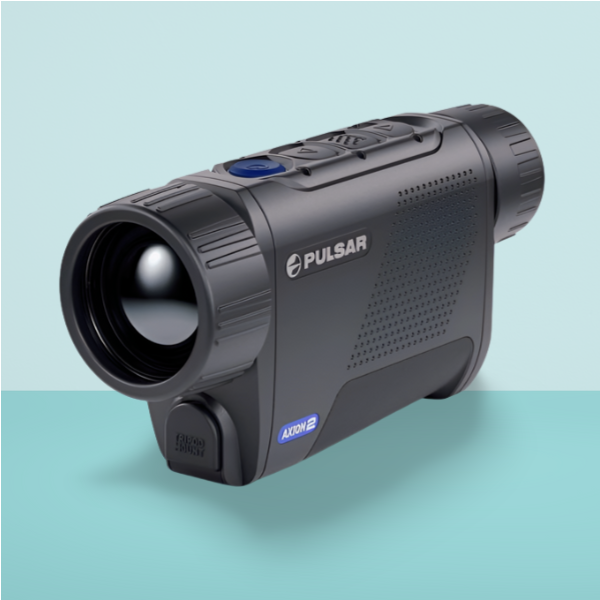
BALANCED HANDHELD THERMAL VIEWING
Pulsar Axion 2 XQ35
- 384×288 thermal sensor; 50 Hz
- 35mm F/1.0 lens; 2–8x viewing magnification
- 10.7° x 8° field of view
- 640×400 AMOLED display
- APS 5 battery; up to 11 hours at 22°C
- 16GB internal storage; Stream Vision 2
- 380g with battery; IPX7 rating
Check model 77478, the supplied battery, seller warranty, and current price before ordering.
View on AmazonPros
- 2x base magnification keeps a useful amount of ground in view.
- Replaceable battery makes longer outings easier to plan.
- Recording and app connectivity support reviewing and sharing observations.
- A weather-rated housing suits outdoor observation within the stated limits.
Cons
- Less sensor detail than the 640×480 Axion 2 XG35.
- No built-in laser rangefinder on this standard version.
- Digital enlargement cannot recover detail the sensor did not capture.
- Internal storage is fixed rather than a removable SD card.
Image detail: what the sensor can—and cannot—show
The thermal sensor and display do different jobs. The sensor captures the heat information; the display presents it. A display with more pixels cannot invent finer thermal detail than the sensor recorded. That distinction is important when comparing listings that lead with a screen resolution rather than a detector specification.
For practical buying decisions, look for footage showing the exact model at a stated distance and in comparable conditions. A large warm object against a cool background is easier to notice than a small subject whose temperature is close to its surroundings. A clean promotional image does not establish what you will resolve on a damp evening or through partial cover.
Pulsar quotes detection of a deer-sized target at 1,300m. That is not a coyote identification distance or a promise that the animal’s features will be clear. For coyote observation, treat a distant warm shape as a reason to look more closely, not as confirmation of species. Vegetation can hide the details you need even when part of the heat source is visible. Our detection and identification guide explains why those are different levels of information.
Magnification and scanning coverage
The corrected viewing range is 2–8x, rather than the 2.5–10x stated in the old review. Begin at the base setting when covering an area, then enlarge the image if you need a closer look. More enlargement gives a larger image of the same captured information; it does not turn an uncertain subject into a reliably identified one.
Consider where you normally look. Nearby ground and moving wildlife can be awkward to follow in a narrow view. Larger, more distant subjects may benefit from a different lens or more sensor resolution. Do not choose solely by the maximum magnification printed on the product page.
Handling, controls, and outdoor use
Judge portability with the battery installed. The manual’s battery-inclusive figure is more useful than comparing one product’s bare-body weight with another product’s ready-to-use weight. Also consider whether you can reach the controls with gloves, focus comfortably with one hand, and raise the monocular repeatedly without fatigue.
Image settings offer choices rather than a universal best mode. Try the available palettes, brightness, and contrast against the scene you actually observe. An image that looks bright indoors may be uncomfortable after your eyes have adapted to darkness. Familiarity with the controls matters more than having a long feature list you rarely use.
The IPX7 rating describes water protection under specified conditions; it is not a guarantee against drops, damaged seals, or every outdoor situation. Check the manual’s handling instructions and keep covers, seals, and the battery compartment in good condition. No thermal view reveals every obstacle, so stop to scan instead of treating it as normal vision while walking.
Battery and charging: plan beyond the headline runtime
Pulsar’s rating is up to 11 hours at 22°C, not a measured result from this review. Recording, wireless use, cold weather, and battery condition can reduce the time available. Plan a margin for the way you use the device rather than assuming a full evening from any battery in any conditions.
A spare compatible pack can be more useful than chasing an extra hour in a specification table. Before ordering, check what the package includes, whether a separate charger is supplied, and the cost of a spare. Follow the battery manufacturer’s charging instructions, especially after bringing equipment indoors from the cold.
Recording, app use, and distance estimates
The corrected storage figure is 16GB, and the relevant app is Stream Vision 2. Recording is useful for reviewing an uncertain sighting or documenting a wildlife encounter, but it does not add detail that was absent in the live image. Transfer important files regularly rather than treating the device as their only copy.
The standard XQ35 does not have the built-in laser rangefinder found on LRF versions. Its stadiametric estimate relies on an assumed subject size and how you frame it. That is a different function from measuring distance with a laser, and the result should not be presented as equivalent.
Axion 2 XQ35 vs Taipan TM19-384 vs Axion 2 XG35
| Feature | Pulsar Axion 2 XQ35 | AGM Taipan TM19-384 | Pulsar Axion 2 XG35 |
|---|---|---|---|
| Thermal sensor | 384×288 | 384×288 | 640×480 |
| Lens | 35mm F/1.0 | 19mm F/1.0 | 35mm F/1.0 |
| Base magnification | 2x | 2x | 2.5x |
| Digital viewing | 2–8x overall | 2x, 4x, 8x digital steps | 2.5–20x overall |
| Field of view | 10.7° x 8° | 13.8° x 10.4° | 12.5° x 9.4° |
| Display | 640×400 AMOLED | 1280×960 LCOS | 1024×768 AMOLED |
| Battery rating | Up to 11h at 22°C | Over 7.5h with Wi-Fi off | Up to 7h at 22°C |
| Battery arrangement | Replaceable APS 5 | Internal rechargeable | Replaceable APS 5 |
| Storage / Wi-Fi | 16GB / yes | 8GB / yes | 16GB / yes |
| Protection rating | IPX7 | IP67 | IPX7 |
| Product listing | View XQ35 on Amazon | View TM19-384 on Amazon | View XG35 on Amazon |
These are manufacturer figures, not a controlled head-to-head test. Different runtime conditions prevent a simple battery-life ranking, and the Taipan’s higher display resolution does not give it a higher-resolution thermal sensor than the XQ35.
Which alternative makes more sense?
Compare the Taipan TM19-384 if a wider view and its current price appeal more than a replaceable battery. Compare the Axion 2 XG35 if resolving finer detail is the reason you are upgrading; it combines a higher-resolution sensor with a wider view than the XQ35. The XQ35 remains worth considering when its complete offer is meaningfully better suited to your spending limit.
What to check before buying
- Exact identity: confirm standard XQ35 model 77478 rather than assuming Pro, LRF, XG35, and similarly named Axion models share the same specification.
- Complete package: check battery, charger, cable, case, and any accessories against the listing.
- Condition and warranty: confirm the seller’s return process and written coverage, particularly for used or refurbished equipment.
- Demonstrations: prefer examples that identify the model, distance, weather, and zoom setting.
- Total cost: include a spare battery or charger if you need them; compare complete offers rather than headline prices.
Sources and review approach
Specifications were checked against the Pulsar Axion 2 XQ35 manual, Axion 2 XG35 manual, and AGM Taipan TM19-384 specifications. This is a specification-based review with buying analysis, not an account of measured field testing. Manufacturer figures may be revised; match the documentation to the supplied unit.
YOUR NEXT STEP
Is the Pulsar Axion 2 XQ35 worth considering?
The Axion 2 XQ35 is worth considering if you want a handheld thermal monocular with recording, a replaceable battery, and a practical balance of scanning coverage and image detail. Its value depends on the complete offer: the right price, a healthy battery, and dependable warranty coverage.
Choose it for regular wildlife scanning and reviewing recorded sightings, with realistic expectations about distant identification and digital zoom.
View the Pulsar Axion 2 XQ35 on AmazonFrequently asked questions
Is this the XQ35 Pro or LRF model?
No. This review covers the standard Axion 2 XQ35, model 77478. Pro and LRF versions have different features or specifications, so check the model number rather than relying on the family name.
Can it identify an animal at its maximum detection distance?
A detection rating establishes neither species identification nor a clear detailed view. Subject size, distance, weather, contrast, and obstructions affect what you can resolve. An uncertain heat signature remains uncertain even after digital enlargement.
Does the Taipan TM19-384 have Wi-Fi?
Yes. AGM’s datasheet lists a Wi-Fi hotspot and onboard recording. The previous comparison’s “No” entry was incorrect.
Can I add a memory card?
The XQ35 uses built-in storage rather than a removable SD card slot. Transfer recordings through the supported connection options and keep separate copies of anything important.